This post is very similar to my earlier post on Implementation of SelectManyCheckBox component. The use case/functionality remains same. But it defers only in the usage of SelectManyCheckBox component. In earlier post, I used it in a form layout. In this blog, I will explain how to use SelectManyCheckBox/SelectManyChoice component inside a table column for persisting/displaying the selected values for an EMP record as shown:

Steps are:
1. Create a Fusion Web Application.
2. Create all the required Business Components (EO, VO,VLink AM) for the above data model.
2. Create all the required Business Components (EO, VO,VLink AM) for the above data model.
3. Create a view link between EmpVO and EmpRolesVO,
which will be used to display the SelectManyCheckBox as selected for an EMP record/row.
The above 3 steps are similar to the steps in earlier post.
4. Create two transient attributes SelectedRoles, StoredRoles in EmpVO. StoredRoles is used to fetch the selected roles from db for an EMP record. Where as SelectedRoles is populated when roles are selected for an EMP record from the UI.
5. Override the getter method of StoredRoles attribute in EmpVORowImpl as shown below:

6. Drag and drop EmpVO as ADF table on the page.
7. Create another column in the table and then drag a SelectManyCheckBox UI component in it and bind the value property of it to a managed bean, which evaluates the Roles to be displayed as selected for an EMP row as shown:
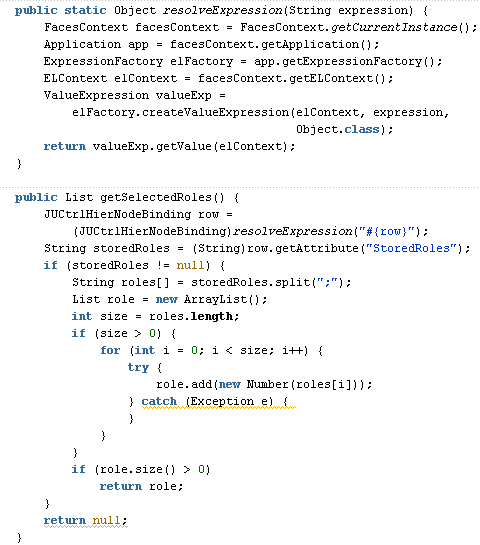
Here the expression #{row} will give handle of each row being stamped in the table. Using this row, we can get StoredRoles attribute which is calculated in the getter method (EmpVORowImpl) for each EMP row using the ViewLinkAccessor as explained in Step#5 above. StoredRoles is then returned as a List of RolesId (Number).
8. A valueChangeListener method is called on selecting/un-selecting the SelectManyCheckBox component.

8. A valueChangeListener method is called on selecting/un-selecting the SelectManyCheckBox component.
Here, getSelectedRow method returns the selected row in table. Using this we can populate the SelectedRoles attribute with the value returned from the SelectManyCheckBox component. Then the selected row keys is saved in a pageFlowScope variable which will be used to commit the data.
9. On clicking of the Commit button, all the data is saved in the database as shown:

I tried getting all the selected row keys using the getSelectedRowKeys() method on table with RowSelection=multiple. But it was returning only the last selected row key. Therefore I have to use the pageFlowScope approach.
Sample Workspace:
Download the sample workspace from HERE.


